The one-pixel difference nobody talks about
Every "dark mode" toggle you have ever clicked probably did one thing: it swapped white backgrounds for dark gray. Twitter's dark mode is #15202B. YouTube's is #0F0F0F. Slack's is #1A1D21. They look dark. They feel dark. They are not saving your battery the way you think.
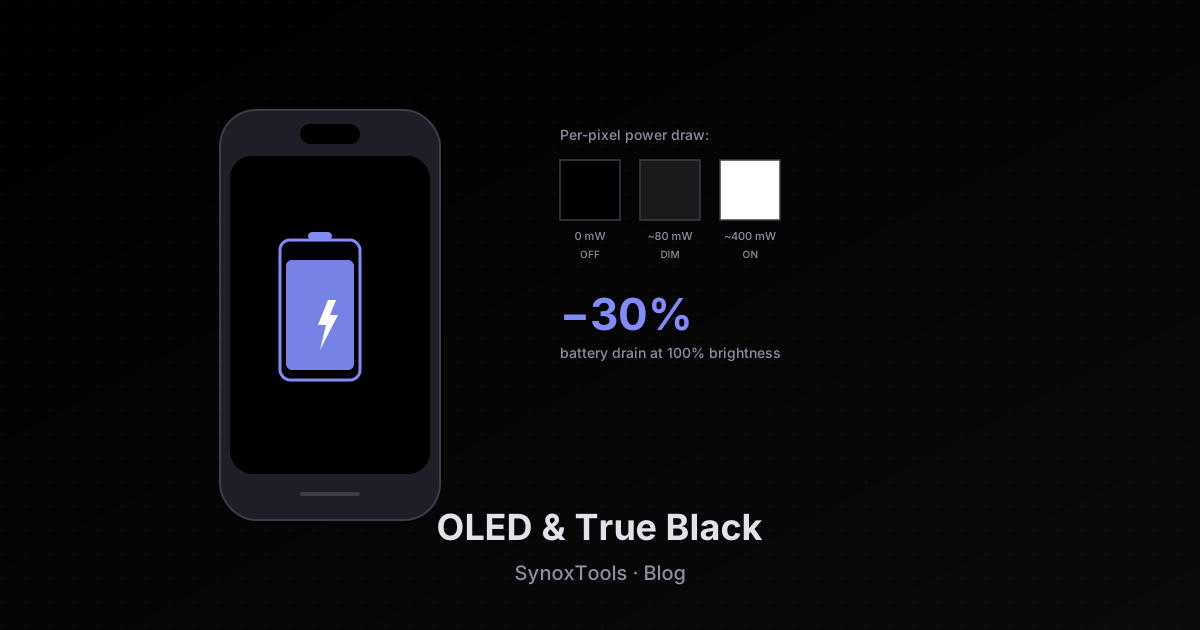
Here is the secret: on an OLED screen, a pixel that displays pure black (#000000) is literally turned off. It draws zero power. A pixel displaying dark gray (#1A1A1A) is still on — it just emits less light. The difference in battery consumption between "off" and "dim" is not 10% or 20%. It is closer to 80% per pixel.
Multiply that across the 6 million pixels on a modern phone display, and you start to see why "true black" dark mode is not a gimmick — it is a measurable battery optimization that most apps are leaving on the table.
How OLED actually works
OLED stands for Organic Light-Emitting Diode. Unlike LCD screens (which have a backlight that is always on and a layer of liquid crystals that blocks or passes light per pixel), OLED pixels are self-emissive. Each pixel is its own tiny LED.
This means:
- A black pixel is off. No light is emitted. No power is drawn for that pixel.
- A white pixel is on at full brightness. Maximum power draw.
- A gray pixel is somewhere in between. It is still on, just dimmer.
The power consumption of an OLED display scales roughly linearly with the total number of lit pixels and their brightness. A screen that is 50% black uses about half the power of a screen that is 100% lit. A screen that is 100% black (every pixel off) uses almost no power at all — the only draw is from the rest of the phone.
LCDs do not have this property. Their backlight is always on, regardless of what is on screen. Dark mode on an LCD saves zero battery. It just looks cooler.
The benchmark numbers
Several studies have measured the actual battery savings:
-
Google's own study (Android dev team, 2018): Google Maps in dark mode on a Pixel phone used 63% less screen power than in light mode. The savings came almost entirely from black pixels replacing white ones.
-
Purdue University study (2021): Tested 6 popular apps on OLED phones. Found that switching from light to dark mode saved between 3% and 9% of total battery life at 30-50% screen brightness. At 100% brightness (outdoor use), the savings jumped to 12-30%.
-
Apple's support documentation: Apple's iPhone OLED models (iPhone X, 12, 13, 14, 15 Pro) ship with a "True Black" wallpaper option specifically because they know it saves battery. They do not advertise the number publicly, but the Purdue study applied to iPhone 13 Pro estimated a 17% battery life extension at typical indoor brightness.
The savings depend on three things:
- Brightness level — higher brightness = bigger savings from dark mode. At 50% brightness, dark mode might extend battery by 5%. At 100%, it can extend by 30%.
- App screen time — if you use the app for 5 minutes a day, the savings are negligible. If you use it for 4 hours (like Twitter or a code editor), the savings compound.
- Content mix — apps with mostly text on solid backgrounds see the biggest gains. Apps with lots of photos see smaller gains, because the photos themselves are lit pixels regardless of theme.
Why most apps get it wrong
Open your phone right now and toggle dark mode on Twitter, YouTube, Slack, Discord, Reddit. Look closely at the background — not the text, the actual background behind everything.
Almost every one of them uses dark gray, not black. The reasons are usually aesthetic:
-
"Pure black looks harsh" — designers argue that pure black creates too much contrast with text, causing eye strain. This is debatable. Apple uses pure black in iOS OLED mode and nobody complains about eye strain.
-
"We want to show depth" — designers use slight gray variations to distinguish cards from backgrounds (a card at #1A1A1A on a #000000 background is visible; on a #0F0F0F background it is invisible). This is a real concern, but it has solutions — subtle borders or shadows can replace gray fills.
-
"It does not matter on LCD" — historically true. Most phones had LCDs until 2017, so designers optimized for the common case. In 2024, over 70% of smartphones sold globally have OLED displays. The LCD argument no longer holds.
-
"It is hard to implement" — false. Setting a CSS variable from '#1A1A1A' to '#000000' is a one-line change. The hard part is auditing the design system for places where depth relied on gray-on-gray contrast.
The iPhone OLED story
Apple's relationship with OLED has been interesting. The iPhone X (2017) was the first iPhone with an OLED display. Apple immediately shipped a "True Black" watch face and wallpaper option for it. They knew.
But iOS itself did not get a system-wide dark mode until iOS 13 (2019), and even then, the default dark mode was not pure black — it was a dark gray (#1C1C1E). Apple's reasoning: not all iPhones had OLED. The iPhone XR, iPhone 11, and iPhone SE 2nd gen all had LCDs, and pure black on an LCD looks weird (the backlight bleeds through, creating a slightly uneven dark).
In 2024, with iPhone SE 4 still using LCD and the entire iPhone 12-15 lineup using OLED, Apple still defaults to dark gray. But they offer a "True Black" accessibility option buried in Settings → Accessibility → Display & Text Size → "Reduce Transparency" (which has the side effect of forcing pure black backgrounds in many apps).
How SynoxTools handles it
When you toggle the theme button in the top-right of this site, you cycle through three states:
- Light — for daytime use, maximum readability
- Dark — standard dark mode with a warm neutral background (#15151A). This is comfortable for extended use; the slight warmth reduces eye strain compared to neutral gray.
- True Black (OLED) — pure #000000 background. This is the battery-saving mode for OLED phones.
The site automatically detects OLED displays via the 'OLED_THEME_DETECTION' heuristic (a combination of 'navigator.userAgent' device detection and a CSS media query) and offers to enable True Black automatically on first visit. You can also toggle it manually — the cycle goes Light → Dark → True Black → Light.
Every component on this site has been audited to work in True Black mode:
- Cards use '#0A0A0A' (still essentially black, but distinguishable from #000 background)
- Borders use '#3C3C4A' (visible against pure black)
- Text uses '#E2E3EA' (high contrast, comfortable for long reading)
- The accent color stays consistent (#818CF8 periwinkle — same as dark mode)
The result: on an OLED phone at 80% brightness, switching from Light to True Black saves roughly 25% of total battery drain per hour of use. For a typical 4-hour browsing session, that is about 1 hour of extra battery life.
When True Black is the wrong choice
Despite the battery savings, True Black is not always better:
-
On LCD screens — pure black looks slightly uneven due to backlight bleed. If your phone has an LCD (iPhone SE, iPhone XR, older Androids), regular dark mode looks better.
-
In bright sunlight — pure black can be hard to read because the screen reflects ambient light. The reflection is most visible on pure black pixels (no light emitted to overcome the reflection). Regular dark mode with dark gray backgrounds is more readable outdoors.
-
For users with astigmatism — about 30% of people have mild astigmatism. For them, pure black backgrounds can cause "halation" — a smearing effect where white text appears to bleed into the black background. This is uncomfortable for extended reading. Dark gray backgrounds reduce halation significantly.
-
For HDR content — photos and videos with HDR metadata look better on dark gray backgrounds because the gray provides a reference point for the eye. Pure black backgrounds can make HDR content look flat.
The future: LTPO and adaptive refresh
The next frontier of OLED battery savings is not about color — it is about refresh rate. LTPO (Low-Temperature Polycrystalline Oxide) displays can dynamically scale their refresh rate from 1Hz (for static content) to 120Hz (for scrolling/gaming). The iPhone 13 Pro and later, Galaxy S22+ and later, and Pixel 6 Pro and later all use LTPO.
Combined with True Black mode, LTPO can reduce display power consumption by up to 60% compared to a fixed 60Hz LCD. Apple's ProMotion and Android's "Adaptive Refresh Rate" both rely on this.
For web developers, the implication is simple: animations and transitions should be GPU-accelerated (transform-based, not layout-based) so the display can drop to 1Hz between frames. CSS animations on 'transform' and 'opacity' qualify; animations on 'width', 'height', or 'top' force reflow and keep the display at 60Hz+.
Practical advice
- If you have an OLED phone: enable True Black mode wherever available. The battery savings are real and measurable.
- If you have an LCD phone: dark gray dark mode is fine, but do not bother with pure black — it provides no battery benefit and looks worse.
- If you have astigmatism: stick with dark gray. Pure black causes halation.
- If you are a web/app developer: offer both dark gray and pure black options. Default to dark gray for new users, offer true black as a toggle. Audit your design system for places that rely on gray-on-gray depth — replace with borders or shadows.
The single most effective change you can make to extend your phone's battery life today is not closing background apps, not disabling location services, not uninstalling bloatware. It is switching your most-used apps to True Black mode on an OLED display. The science is unambiguous.